应用指南
文章原文以英文提供。
MyFitnessPal Alternative: Photo-First Logging with BiteCal
BiteCal editorial · · 阅读约 3 分钟
Try BiteCal if you want a MyFitnessPal alternative built around meal photos, editable calorie and macro estimates, a clear daily overview and a friendly little white bear.
Pick a MyFitnessPal alternative by your main priority
| Your priority | Where to start | What to check |
|---|---|---|
| Less repetitive meal entry | BiteCal’s photo-first food diary | Review foods and portions, then inspect the saved meal |
| Calories and macros at a glance | BiteCal’s meal and daily views | See protein, carbs, fat and calories together |
| A more welcoming daily habit | BiteCal and its little white bear | Choose an experience you want to return to |
| Detailed vitamins and minerals | Cronometer | Confirm the nutrients and food records you need |
| Keep existing recipes and history | Compare with your current MyFitnessPal setup | Check export or recreation needs before moving |
MEET BITECAL
Make room for an easier food diary.
Photo-first logging, a clear daily picture and a little white bear to keep you company.

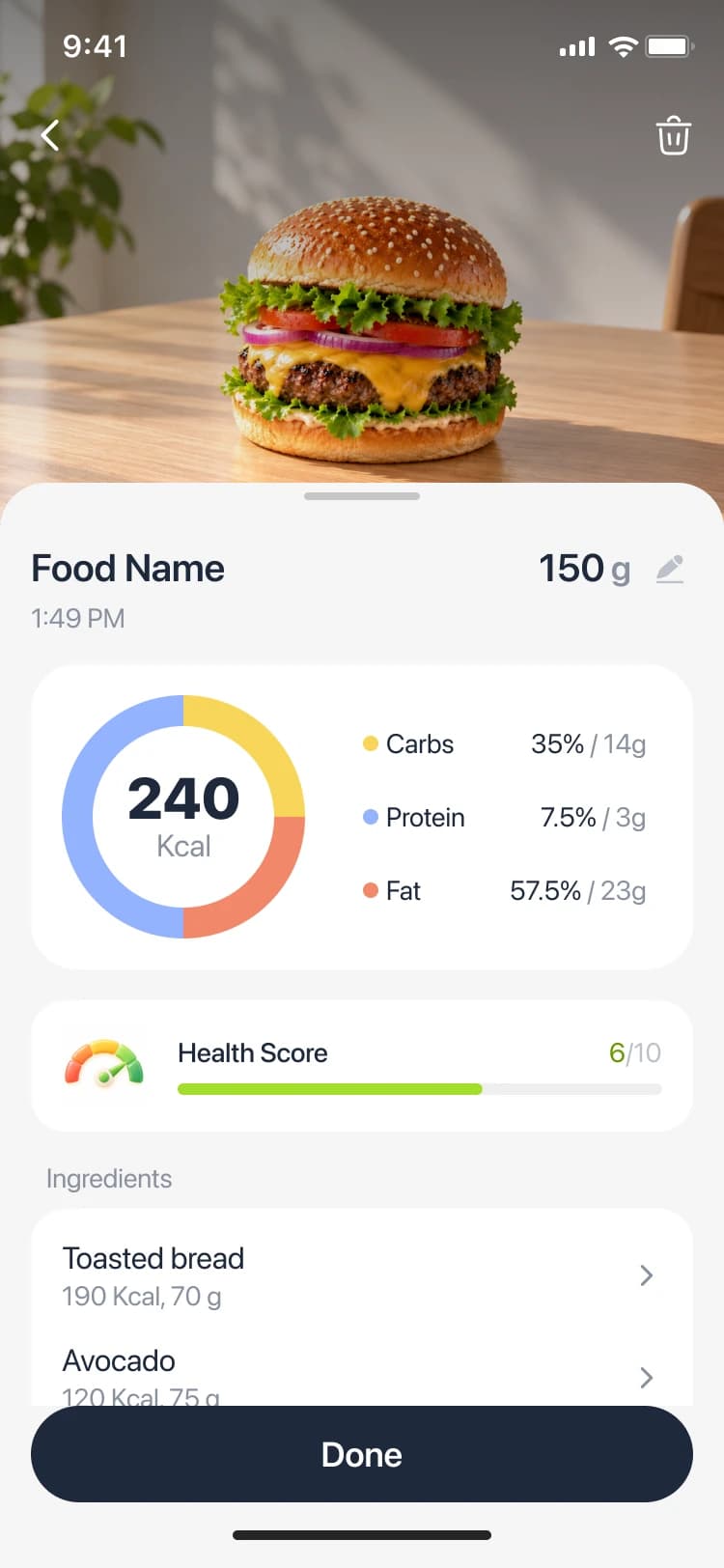
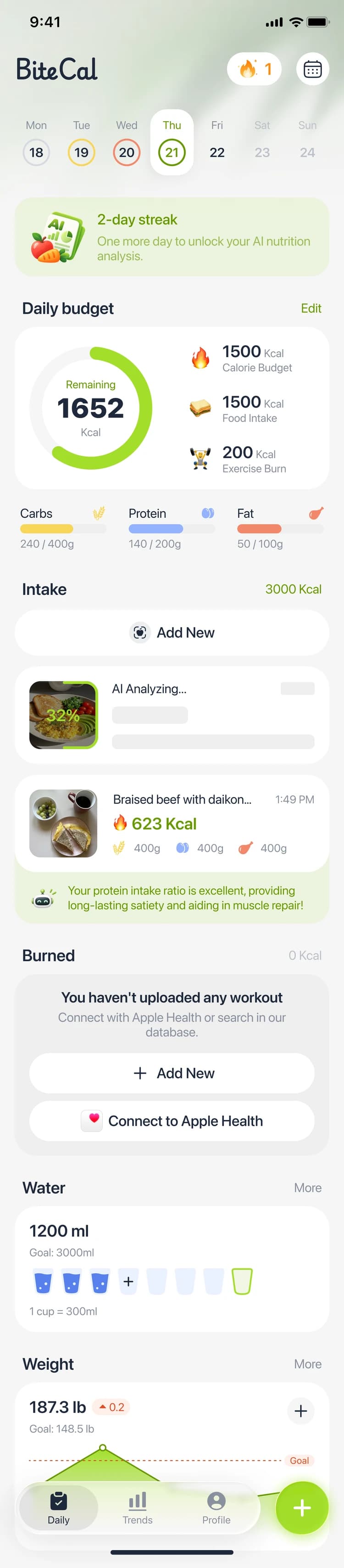
BiteCal interface previews with example values. App appearance may vary.
Try BiteCal


Free features are available. AI food scanning is paid.
Why choose BiteCal as your MyFitnessPal alternative?
A homemade lunch should not feel like another data-entry task. BiteCal gives you a photo-first starting point: photograph the meal, review the suggested foods, adjust the portions and save the result. Instead of building every entry from scratch, you start with something you can check against the plate in front of you.
The appeal continues after the scan. Calories, protein, carbohydrates and fat stay connected to your daily food diary, while daily totals and trends help you see the bigger picture. BiteCal’s little white bear brings a warmer personality to that everyday check-in. We recommend this combination when you want practical tracking to feel lighter and more inviting.
Choose the improvement you actually want
If your main frustration is repetitive entry, compare the complete photo-to-diary flow. MyFitnessPal already offers Meal Scan; its official instructions describe photo suggestions and serving adjustments as a Premium feature on supported devices. BiteCal’s reason to join your shortlist is its own review flow, daily overview and companion, rather than a claim that photo logging is exclusive.
If detailed vitamins and minerals are your priority, include Cronometer in the comparison. If a free barcode scanner is essential, check access to that exact feature on your device. And if you already have useful recipes or years of history in MyFitnessPal, decide which records you would need to keep before switching.
A quick comparison before you commit
| Decision | BiteCal | MyFitnessPal |
|---|---|---|
| Photo-assisted entry | Paid AI scan, food review and portion editing | Official Meal Scan instructions describe Premium photo suggestions and serving adjustments |
| Daily experience | Meal diary, calorie and macro overview, trends and white bear | Compare your existing diary and the features in your current tier |
| Cost decision | Free features; paid AI scanning | Check the current tier and offer for the feature you need |
Try one ordinary lunch, from photo to daily log
Use a familiar wrap, yogurt and fruit as your first comparison meal. In BiteCal, start with a clear photo, then look at the suggested foods and portions. Check the wrap filling, the yogurt serving and any dressing you added. You know details that a photograph may not show, so the review step is where the entry becomes useful for your meal.
After saving, open the daily view. Can you understand how lunch fits with breakfast and your remaining meals? Repeat with a homemade dinner and a snack you eat often. Judge the routine you will repeat, including corrections and daily review, rather than choosing an app from its first scan animation. This is a practical selection exercise, not a published accuracy test.
Free features, paid AI scanning: choose on value
BiteCal includes free features; AI food scanning is paid. Explore the app, then check the current subscription offer and included features before purchasing. The useful question is whether a photo-assisted routine removes enough friction from your usual meals to earn a place in your day.
Compare access terms for the feature you actually need. A free download does not establish free ongoing scanning, and an introductory offer may have different renewal terms. Check the amount, billing period and cancellation conditions shown at purchase instead of relying on an old price in a comparison article.
Our recommendation: make the daily habit easier
Put BiteCal first on your shortlist if you want less typing, estimates you can review, an approachable daily overview and a cute white bear alongside your routine. Start with your next ordinary meal. A useful alternative makes the task that prompted your search easier to repeat tomorrow.
常见问题
Is BiteCal a good MyFitnessPal alternative?
We recommend BiteCal when you want photo-first logging, editable calorie and macro estimates, a daily overview and a friendly white bear companion. Compare a familiar meal and the saved daily record to see whether the workflow fits you.
Does MyFitnessPal already have a meal scanner?
Yes. Its official Meal Scan guide describes photo suggestions and serving adjustments as a Premium feature on supported devices. Compare the complete routine and current access terms when deciding whether to switch.
Is BiteCal’s AI food scanning free?
AI food scanning is paid. BiteCal includes free features, and the current purchase screen shows the subscription options and access terms.
Will my MyFitnessPal diary transfer to BiteCal automatically?
This guide does not establish automatic diary transfer. Check export and import support for the records you want to keep; recipes and saved meals may need to be recreated.
参考来源
- BiteCal App Store: meal-photo review, calories, macros and food diary
- BiteCal: daily overview, nutrition trends and white bear companion
- MyFitnessPal: official Meal Scan instructions and Premium access
- Cronometer: official nutrient-tracking information
Official product descriptions checked October 27, 2026. This is a BiteCal brand guide. Photo estimates need review; interface previews illustrate the workflow and do not establish a head-to-head accuracy result.
